Using Adapters
Introduction
Adapters let you change the mutation and crossover probabilities as the optimization progresses, instead of keeping them fixed for every generation. In practice, an adapter is a small schedule that returns a new probability at each generation.
This makes it possible to express different search strategies, for example:
Start with a high mutation probability to explore more diverse solutions, then slowly reduce it to refine the most promising candidates.
Start with a low crossover probability and increase it over time.
Use different schedules for mutation and crossover.
All adapters use three parameters:
initial_value: value used at generation 0.
end_value: target value approached by the schedule.
adaptive_rate: controls how quickly the schedule approaches
end_value. Larger values make the schedule change faster.
The following notation is used throughout this tutorial:
Name |
Notation |
|---|---|
initial_value |
\(p_0\) |
end_value |
\(p_f\) |
current generation |
\(t\) |
adaptive_rate |
\(\alpha\) |
value at generation t |
\(p(t; \alpha)\) |
The initial value \(p_0\) does not need to be greater than the final value \(p_f\).
If \(p_0 > p_f\), the adapter defines a decay toward \(p_f\).
If \(p_0 < p_f\), the adapter defines an ascent toward \(p_f\).
All non-constant adapters \(p(t; \alpha)\), for \(\alpha \in (0,1)\), have the following properties:
The following adapters are available:
ConstantAdapter
ExponentialAdapter
InverseAdapter
PotentialAdapter
ConstantAdapter
This adapter is mainly used internally by the package. When you pass the
crossover or mutation probability as a real number, the package converts that
number into a ConstantAdapter. This lets the optimization code use the same
internal API for both fixed probabilities and scheduled probabilities.
Its definition is:
ExponentialAdapter
The ExponentialAdapter changes the probability exponentially:
Usage example:
from sklearn_genetic.schedules import ExponentialAdapter

# Decay from initial_value toward end_value
adapter = ExponentialAdapter(initial_value=0.8, end_value=0.2, adaptive_rate=0.1)

# Run a few iterations
for _ in range(3):
    adapter.step()  # 0.8, 0.74, 0.69
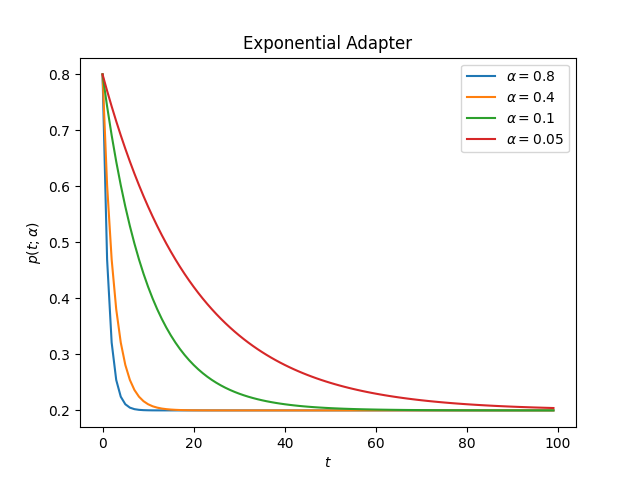
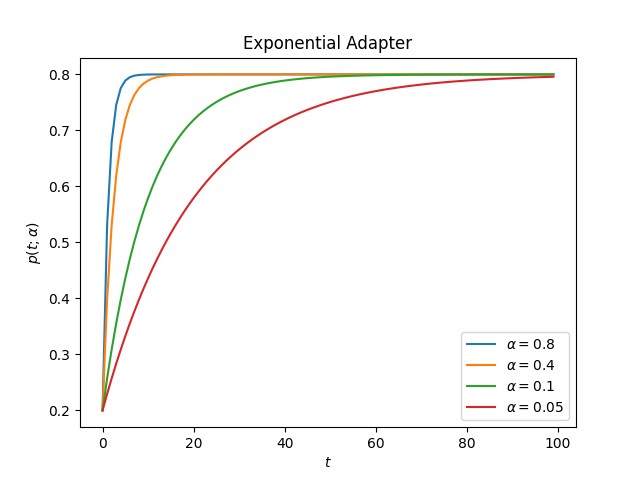
The following plots show the adapter for different values of \(\alpha\). Larger values of \(\alpha\) move toward the target value more quickly.
decay:
ascent:
import matplotlib.pyplot as plt
from sklearn_genetic.schedules import ExponentialAdapter

values = [{"initial_value": 0.8, "end_value": 0.2},  # Decay
          {"initial_value": 0.2, "end_value": 0.8}]  # Ascent
alphas = [0.8, 0.4, 0.1, 0.05]

for value in values:
    for alpha in alphas:
        adapter = ExponentialAdapter(**value, adaptive_rate=alpha)
        adapter_result = [adapter.step() for _ in range(100)]

        plt.plot(adapter_result, label=r'$\alpha={}$'.format(alpha))

    plt.xlabel(r'$t$')
    plt.ylabel(r'$p(t; \alpha)$')
    plt.title("Exponential Adapter")
    plt.legend()
    plt.show()
InverseAdapter
The InverseAdapter changes the probability with inverse decay:
Usage example:
from sklearn_genetic.schedules import InverseAdapter

# Decay from initial_value toward end_value
adapter = InverseAdapter(initial_value=0.8, end_value=0.2, adaptive_rate=0.1)

# Run a few iterations
for _ in range(3):
    adapter.step()  # 0.8, 0.75, 0.7
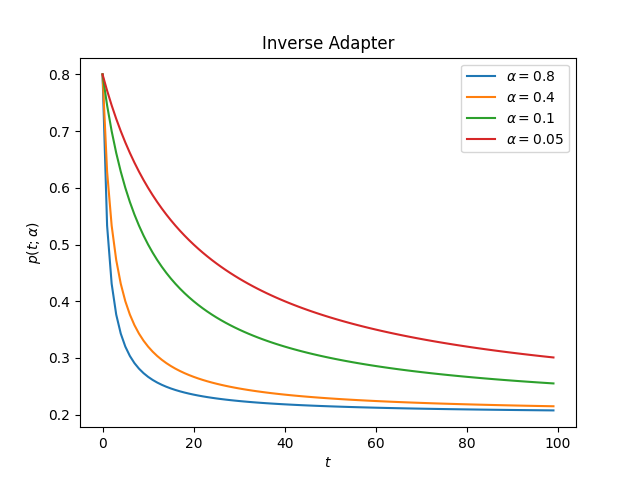
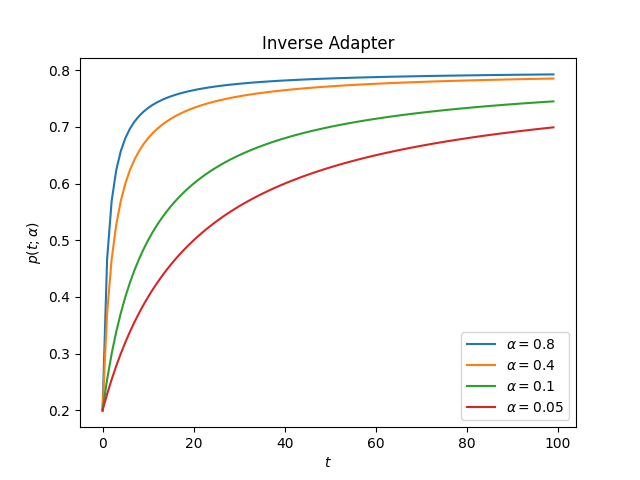
The following plots show the adapter for different values of \(\alpha\).
decay:
ascent:
PotentialAdapter
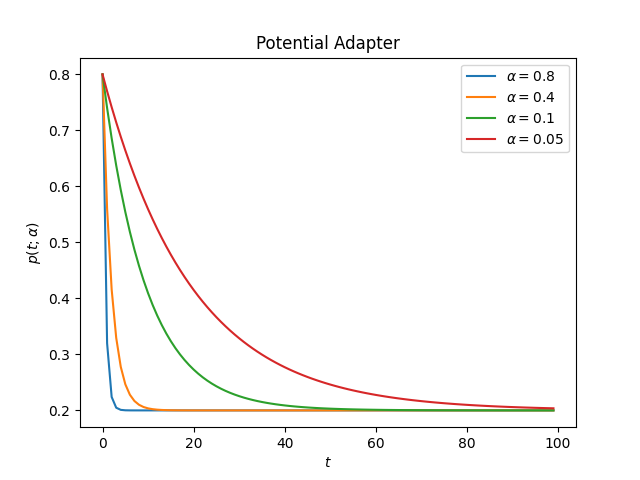
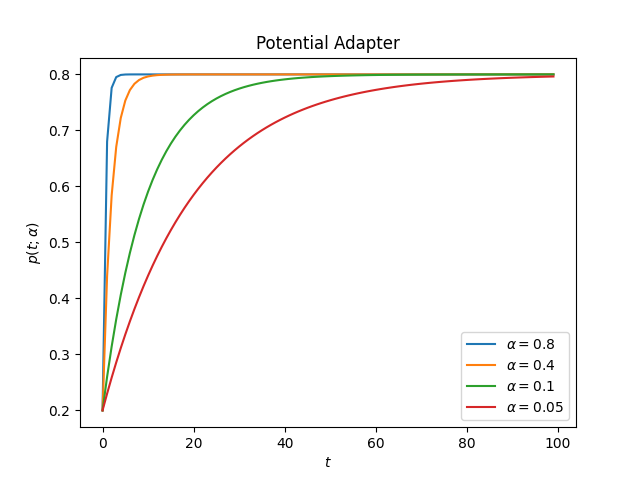
The PotentialAdapter changes the probability with the following form:
Usage example:
from sklearn_genetic.schedules import PotentialAdapter

# Decay from initial_value toward end_value
adapter = PotentialAdapter(initial_value=0.8, end_value=0.2, adaptive_rate=0.1)

# Run a few iterations
for _ in range(3):
    adapter.step()  # 0.8, 0.26, 0.206
The following plots show the adapter for different values of \(\alpha\).
decay:
ascent:
Compare
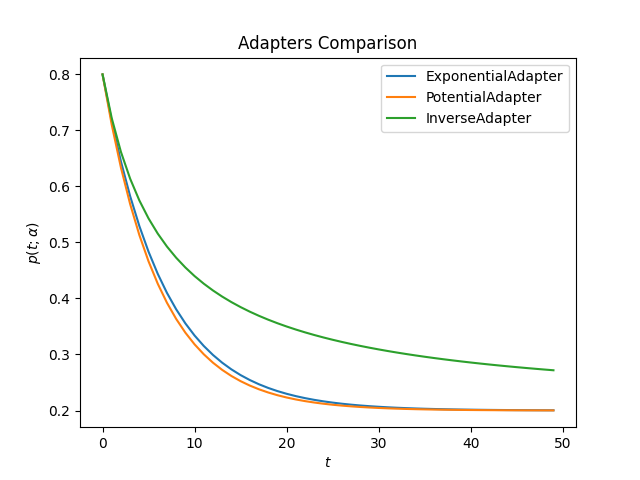
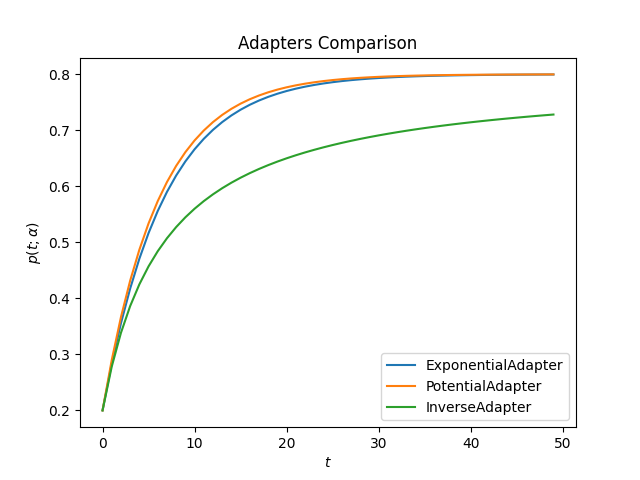
The following plots compare all adapters using the same value of \(\alpha\).
decay:
ascent:
import matplotlib.pyplot as plt
from sklearn_genetic.schedules import ExponentialAdapter, PotentialAdapter, InverseAdapter


params = {"initial_value": 0.2, "end_value": 0.8, "adaptive_rate": 0.15}  # Ascent
adapters = [ExponentialAdapter(**params), PotentialAdapter(**params), InverseAdapter(**params)]

for adapter in adapters:
    adapter_result = [adapter.step() for _ in range(50)]

    plt.plot(adapter_result, label=f"{type(adapter).__name__}")

plt.xlabel(r'$t$')
plt.ylabel(r'$p(t; \alpha)$')
plt.title("Adapters Comparison")
plt.legend()
plt.show()
Full Example
In this example, we create a decay schedule for the mutation probability and an ascent schedule for the crossover probability. Let us call them \(p_{mt}(t; \alpha)\) and \(p_{cr}(t; \alpha)\), respectively.
The recommended default is to start with high crossover (0.8) and low
mutation (0.1). Crossover is the primary search operator — it recombines
good parameter combinations from high-fitness parents. Mutation provides
exploratory perturbation and should be kept small so that discovered good
regions are refined rather than abandoned.
A useful adaptive strategy keeps crossover high and gently increases mutation later to escape stagnation. The implementation requires:
The same idea can be used for hyperparameter tuning or feature selection.
from sklearn_genetic import EvolutionConfig, GASearchCV, PopulationConfig, RuntimeConfig
from sklearn_genetic.schedules import ExponentialAdapter
from sklearn_genetic.space import Continuous, Categorical, Integer
from sklearn.ensemble import RandomForestClassifier
from sklearn.model_selection import train_test_split, StratifiedKFold
from sklearn.datasets import load_digits
from sklearn.metrics import accuracy_score

data = load_digits()
n_samples = len(data.images)
X = data.images.reshape((n_samples, -1))
y = data['target']
X_train, X_test, y_train, y_test = train_test_split(X, y, test_size=0.33, random_state=42)

clf = RandomForestClassifier()

# Start with strong recombination and gentle mutation; slightly relax crossover
# over time to allow more diverse offspring if the population stagnates.
crossover_adapter = ExponentialAdapter(initial_value=0.8, end_value=0.6, adaptive_rate=0.1)
mutation_adapter = ExponentialAdapter(initial_value=0.1, end_value=0.2, adaptive_rate=0.1)

param_grid = {'min_weight_fraction_leaf': Continuous(0.01, 0.5, distribution='log-uniform'),
              'bootstrap': Categorical([True, False]),
              'max_depth': Integer(2, 30),
              'max_leaf_nodes': Integer(2, 35),
              'n_estimators': Integer(100, 300)}

cv = StratifiedKFold(n_splits=3, shuffle=True)

evolved_estimator = GASearchCV(estimator=clf,
                               cv=cv,
                               scoring='accuracy',
                               param_grid=param_grid,
                               evolution_config=EvolutionConfig(
                                   population_size=20,
                                   generations=25,
                                   crossover_probability=crossover_adapter,
                                   mutation_probability=mutation_adapter,
                               ),
                               population_config=PopulationConfig(initializer="smart"),
                               runtime_config=RuntimeConfig(n_jobs=-1))

# Train and optimize the estimator
evolved_estimator.fit(X_train, y_train)
# Best parameters found
print(evolved_estimator.best_params_)
# Use the model fitted with the best parameters
y_predict_ga = evolved_estimator.predict(X_test)
print(accuracy_score(y_test, y_predict_ga))

# Saved metadata for further analysis
print("Stats achieved in each generation: ", evolved_estimator.history)
print("Best k solutions: ", evolved_estimator.hof)