Understanding the Evaluation Process
This tutorial explains how GASearchCV evaluates
candidate hyperparameters and how cross-validation fits into the evolutionary
search process.
Two parameters control most of the evaluation behavior:
cvThe cross-validation strategy. This can be an integer or any compatible scikit-learn cross-validator, such as
KFold,StratifiedKFold, orRepeatedKFold. See the scikit-learn cross-validation documentation for more details.scoringThe metric used to evaluate each candidate. For classification, common choices include
"accuracy","precision", and"recall". For regression, common choices include"r2","max_error", and"neg_root_mean_squared_error". The full list is available in the scikit-learn model evaluation documentation.
Evolutionary Algorithm Background
A genetic algorithm is a metaheuristic optimization method inspired by natural selection. In sklearn-genetic-opt, the algorithm searches over possible hyperparameter configurations and uses their cross-validation scores as the fitness signal.
The main concepts are:
Individual: one candidate solution, such as one set of hyperparameters.
Population: a group of individuals evaluated in the same generation.
Generation: one iteration of the evolutionary process.
Fitness value: the score used to compare individuals, usually a cross-validation score.
Genetic operators: operations such as selection, crossover, mutation, and elitism that create the next generation.
At a high level, the process is:
Build an initial population from the search space. This is generation 0.
Evaluate each individual with cross-validation.
Use genetic operators to create a new generation.
Repeat the evaluation and generation steps until the search reaches its generation limit or a callback stops it.
Creating the First Generation
By default, the first generation is built with
PopulationConfig(initializer="smart"). For GASearchCV,
this combines valid warm-start candidates, valid estimator defaults, Latin
hypercube samples for numeric hyperparameters, stratified categorical values,
and duplicate avoidance. For GAFeatureSelectionCV, it
creates duplicate-aware feature masks with varied selected-feature counts. Set
PopulationConfig(initializer="random") to use fully random initialization.
Each individual can be represented as a chromosome-like structure. In the example below, the first generation contains three individuals. Each chromosome encodes one candidate set of hyperparameters:
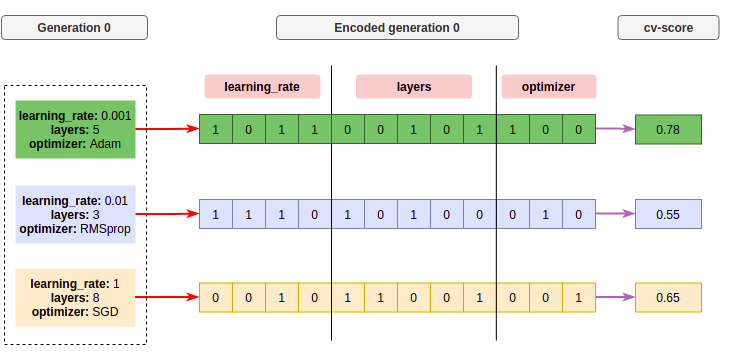
The red arrow represents the encoding step, where hyperparameter values are mapped into a chromosome representation. Each block is a gene, and groups of genes represent hyperparameters. The purple arrow represents scoring: each candidate is decoded, evaluated with cross-validation, and assigned a fitness value.
Creating New Generations
After the initial population is evaluated, the algorithm creates a new
generation. The exact process depends on the selected
algorithms strategy, but the most common operations are
crossover, mutation, selection, and elitism.
Crossover
Crossover combines information from two parent chromosomes to create new children. Parent selection usually favors individuals with better fitness, so stronger candidates have a higher chance of contributing to the next generation.
For example, if individuals 1 and 3 are selected as parents, the algorithm can split their chromosomes and exchange sections:
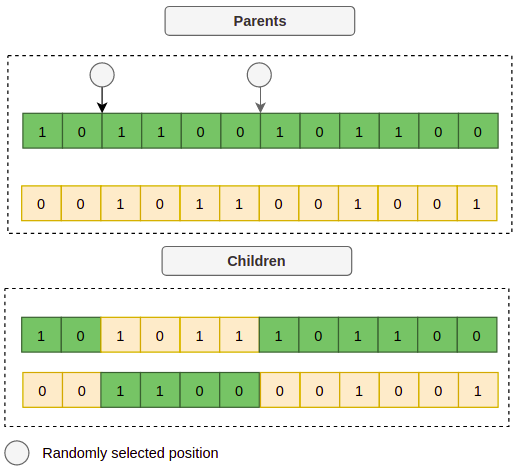
After decoding the child chromosomes, the resulting candidates might look like this:
Child 1: {"learning_rate": 0.015, "layers": 4, "optimizer": "Adam"}
Child 2: {"learning_rate": 0.4, "layers": 6, "optimizer": "SGD"}
Mutation
Crossover alone can make the search converge too quickly around similar solutions. Mutation introduces diversity by randomly changing part of a chromosome. It can alter a single gene or an entire hyperparameter value.
For example, a single gene in a child chromosome can change:

Or the mutation can change a complete hyperparameter, such as the optimizer:

Elitism
Elitism keeps the best individuals from one generation and copies them into the next generation. This helps preserve strong candidates while the rest of the population continues exploring.
After crossover, mutation, selection, and elitism, a new generation may look like this:
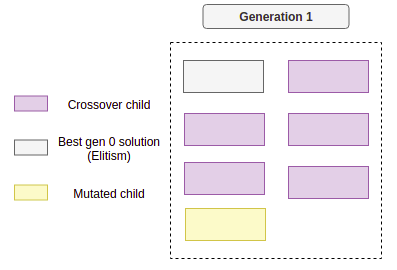
The search repeats this cycle until one of the stopping conditions is met:
The maximum number of generations is reached.
The search exceeds a time budget.
An early-stopping callback detects that the score has reached a threshold or stopped improving.
How GASearchCV Evaluates Candidates
In sklearn-genetic-opt, GASearchCV evaluates
candidate hyperparameters as follows:
Sample
population_sizecandidate configurations fromparam_grid.Fit and score one estimator for each candidate using the configured
cvandscoringvalues.Log generation-level metrics when
verbose=True.Create the next generation using the selected evolutionary algorithm.
Repeat until
generationsis reached or callbacks stop the search.Select the best hyperparameters based on the best individual cross-validation score.
If use_cache=True (the default), candidates that have already been evaluated
reuse their stored fitness values. Duplicate candidates inside the same
generation are also evaluated only once and then recorded for each occurrence.
When n_jobs enables parallel execution, unique candidates in a generation
are evaluated in parallel, while each candidate’s own cross-validation runs
sequentially to avoid nested parallelism. Set RuntimeConfig(parallel_backend="cv") to keep
candidate evaluation serial and pass n_jobs to each candidate’s
cross-validation instead. After fitting, fit_stats_ exposes counters for
actual cross-validation calls, cache hits, duplicate candidates, skipped invalid
candidates, and population-level parallel batches.
The history attribute also includes optimizer telemetry for each generation:
population_size, unique_individuals, unique_individual_ratio,
genotype_diversity, fitness_improvement, fitness_improved,
stagnation_generations, best_generation, mutation_probability,
diversity_control_triggered, random_immigrants,
duplicate_replacements, local_refinements,
fitness_sharing_applied, mean_niche_count, and
max_niche_count. These fields help diagnose whether the search is still
exploring diverse solutions or has started to converge/stagnate around the same
candidates.
When the search space is noisy or rugged, OptimizationConfig(diversity_control=True) can help
avoid premature convergence by increasing mutation, replacing duplicate
candidates, and adding random immigrants after low-diversity or stagnant
generations. When the search has found promising regions,
OptimizationConfig(local_search=True) can run a short neighborhood refinement around the
hall-of-fame candidates without increasing the number of GA generations.
OptimizationConfig(fitness_sharing=True) can reduce selection pressure on crowded niches, so
similar high-scoring candidates do not immediately dominate the population.
The generation log contains summary metrics:
fitnessThe average score across the individuals in the current generation.
fitness_stdThe standard deviation of the individual scores in the current generation.
fitness_bestThe best score found so far. This is the most useful metric for convergence plots and early-stopping callbacks because it is cumulative.
fitness_maxThe best individual score in the current generation.
fitness_minThe worst individual score in the current generation.
Except for fitness_best, these values summarize the current population, not
just the final selected model. For example, if EvolutionConfig(population_size=10), the
fitness value is the average score of the 10 candidates evaluated in that
generation.
The complete flow can be represented like this:
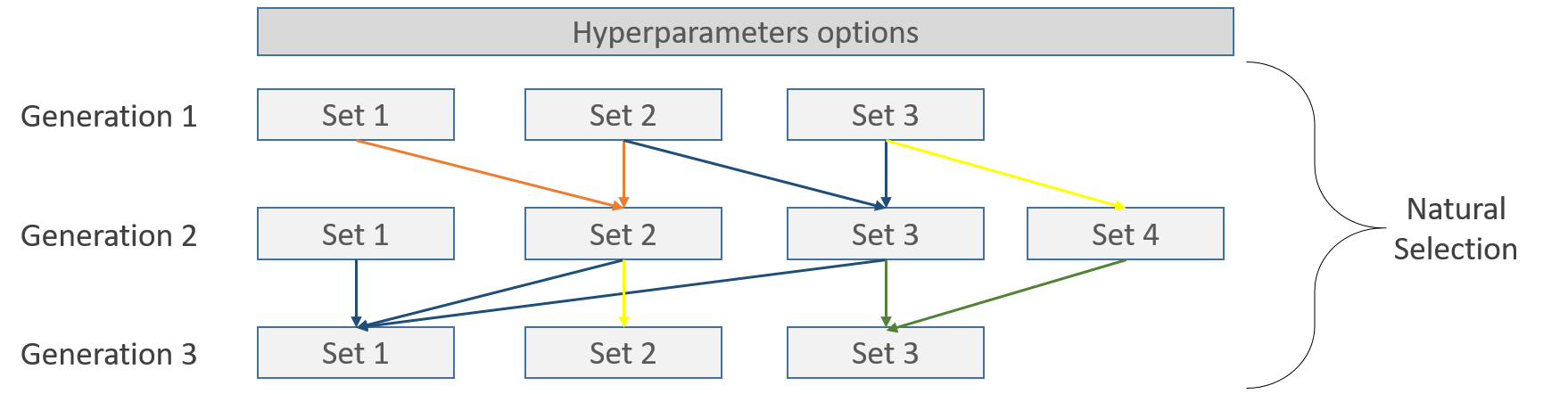
Each candidate is evaluated with cross-validation. For example, a 5-fold strategy splits the data into five train/validation rotations:
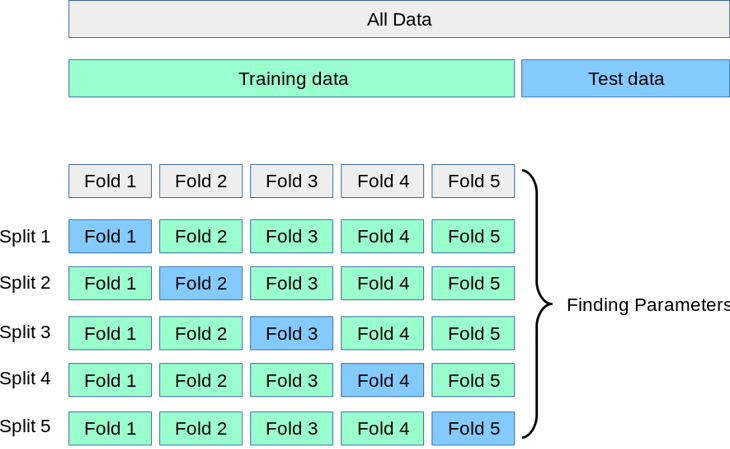
Image taken from scikit-learn.
Example
This example tunes a DecisionTreeRegressor inside a
scikit-learn Pipeline on the diabetes regression
dataset. The search uses 5-fold cross-validation and optimizes the "r2"
metric.
At the end, we print the best hyperparameters and the R-squared score on the test set.
from sklearn.datasets import load_diabetes
from sklearn.metrics import r2_score
from sklearn.model_selection import KFold, train_test_split
from sklearn.pipeline import Pipeline
from sklearn.preprocessing import StandardScaler
from sklearn.tree import DecisionTreeRegressor

from sklearn_genetic import EvolutionConfig, GASearchCV, PopulationConfig, RuntimeConfig
from sklearn_genetic.space import Categorical, Continuous, Integer

data = load_diabetes()
X, y = data["data"], data["target"]

X_train, X_test, y_train, y_test = train_test_split(
    X, y, test_size=0.33, random_state=42
)

cv = KFold(n_splits=5, shuffle=True, random_state=42)

pipe = Pipeline(
    [
        ("scaler", StandardScaler()),
        ("clf", DecisionTreeRegressor(random_state=42)),
    ]
)

param_grid = {
    "clf__ccp_alpha": Continuous(0, 1),
    "clf__criterion": Categorical(["squared_error", "absolute_error"]),
    "clf__max_depth": Integer(2, 20),
    "clf__min_samples_split": Integer(2, 30),
}

evolved_estimator = GASearchCV(
    estimator=pipe,
    cv=cv,
    scoring="r2",
    param_grid=param_grid,
    evolution_config=EvolutionConfig(
        population_size=15,
        generations=20,
        tournament_size=3,
        elitism=True,
        keep_top_k=4,
        crossover_probability=0.9,
        mutation_probability=0.05,
        criteria="max",
        algorithm="eaMuCommaLambda",
    ),
    population_config=PopulationConfig(initializer="smart"),
    runtime_config=RuntimeConfig(n_jobs=-1),
)

evolved_estimator.fit(X_train, y_train)

y_predict_ga = evolved_estimator.predict(X_test)
r_squared = r2_score(y_test, y_predict_ga)

print(evolved_estimator.best_params_)
print("R-squared:", "{:.2f}".format(r_squared))